
Move to iOS
AppleTools
3.614.85K Reviews
- Version
- 4.0.5
- Installs
- 100.00M
- Age Rating
- Everyone
Screenshots
Our Review of Move to iOS
 Analysis by Appyee
If you've ever switched from an Android to an iPhone, you know the process can be a bit daunting. Enter Move to iOS, Apple's official app that promises to make this transition as smooth as possible. I decided to give it a whirl and see if it lives up to the hype. Spoiler alert: it’s a bit of a lifesaver!
Getting Started
First off, you'll need to have both devices handy. The app is available for free on the Google Play Store, and installation is a breeze. Once you fire it up, it guides you through the entire process with a simple interface. Seriously, I felt like an IT wizard even though I was just following on-screen instructions!
The Transfer Process
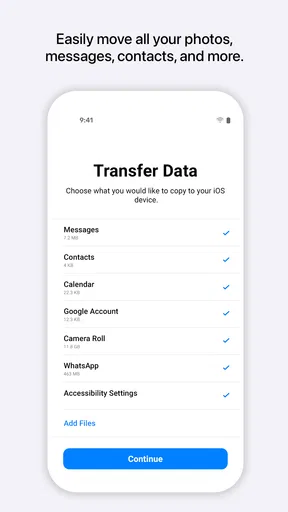
The magic begins when you enter a code generated by your new iPhone into the Move to iOS app. It’s a secure connection, so no worries about your data flying around the internet. From here, you can select what you want to transfer: contacts, message history, photos, videos, web bookmarks, mail accounts—you name it.
What really impressed me was how seamless it felt. The app even transfers your Google account settings, which is a huge win because re-entering all that info on a new device is a chore. The whole process took about 30 minutes for me, but keep in mind it could take longer depending on the amount of data you have.
What It Can’t Do
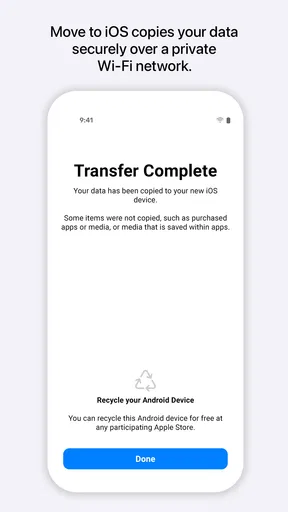
Now, it’s not all rainbows and butterflies. The app doesn’t transfer your apps themselves, just the data. So, you’ll need to redownload apps individually from the App Store. Also, app-specific data, like game progress, may not make the leap unless it’s backed up to a cloud service. Still, considering the scope of what it does handle, this is a minor gripe.
My Final Thoughts
Switching phones used to be a massive headache, but Move to iOS really takes the sting out of it. It's not perfect, but it’s a huge step in the right direction. If you’re planning a switch from Android to iOS, this app is a must-have. It’s free, it’s easy, and it works. What more could you ask for?
In the end, Move to iOS offers a reliable solution for a common problem. It's a tool that genuinely makes life easier and saves a lot of time. So go ahead, make the switch; this app has got your back.
Privacy and Permissions
See what permissions an app requests and how it handles your data.
- Device & app history
- read your Web bookmarks and history
- Identity
- find accounts on the device
- Calendar
- read calendar events plus confidential information
- Contacts
- find accounts on the device, read your contacts
- Location
- approximate location (network-based), precise location (GPS and network-based)
- SMS
- read your text messages (SMS or MMS)
- Phone
- read call log, read phone status and identity
- Photos/Media/Files
- read the contents of your USB storage, modify or delete the contents of your USB storage
- Storage
- read the contents of your USB storage, modify or delete the contents of your USB storage
- Wi-Fi connection information
- view Wi-Fi connections
- Device ID & call information
- read phone status and identity
- Other
- view network connections, read battery statistics, change network connectivity, allow Wi-Fi Multicast reception, connect and disconnect from Wi-Fi, full network access, prevent device from sleeping
Verdict
Strengths of Move to iOS
- Seamless data transfer process.
- Supports multiple data types.
- User-friendly interface.
- Free to use with no ads.
- Direct connection between devices.
Limitations of Move to iOS
- Requires Wi-Fi connection.
- Can be slow with large files.
- Limited to new iOS devices.
- No support for apps transfer.
- Occasional connection drops.
Other Releases by Apple
View All
iTunes
Video Players & Editors4.7

Apple TV: Shows, Movies & More
Entertainment4.1

Apple Music
Music & Audio4.5

Apple TV: Shows, Movies & More
Entertainment4.5
Similar Picks in This Category
View All
Google LLC4.0

Gboard - the Google Keyboard
Google LLC4.5

Google Play services
Google LLC4.3

Google Play Store
Google LLC4.9

Files by Google
Google LLC4.5

SHAREit: Transfer, Share Files
Smart Media4U Technology Pte.Ltd.4.3
You May Also Like
View All


Frequently Asked Questions
What is Move to iOS and how does it work?
Move to iOS is an app developed by Apple to seamlessly transfer data from an Android device to an iPhone or iPad. It works by creating a private Wi-Fi network between the two devices, allowing users to securely transfer contacts, message history, photos, videos, web bookmarks, mail accounts, and calendars to their new iOS device.
Which data can be transferred using Move to iOS?
Move to iOS allows users to transfer a variety of data types including contacts, message history, photos, videos, web bookmarks, mail accounts, and calendars. It does not transfer apps, music, or passwords, so users will need to download apps separately and set up their accounts again on the new device.
Is Move to iOS secure for transferring my data?
Yes, Move to iOS ensures a secure transfer of your data by establishing a private Wi-Fi network. This direct connection between your Android and iOS devices is encrypted, protecting your data from unauthorized access during the transfer process. However, always ensure both devices are fully charged to avoid interruptions.
Can I use Move to iOS after setting up my iPhone?
Move to iOS is designed to be used during the initial setup of your iPhone or iPad. If your iOS device is already set up, you will need to reset it to use Move to iOS. Alternatively, you can manually transfer data using other methods, but Move to iOS offers a more streamlined process during initial setup.
Are there any compatibility requirements for using Move to iOS?
Yes, Move to iOS requires that your Android device is running Android 4.0 or later, and your new iPhone or iPad should be running iOS 9.0 or later. Ensure both devices are connected to a power source during the transfer to prevent any issues caused by battery depletion.
